
How the SDK works
This is the complete picture — what the SDK is, how a submission flows end to end, what's supported, and where it fits in your product. It's the read-through companion to the Questionnaire integration guide, which covers step-by-step setup.
What the SDK is
The SDK collects tax documentation inside your own React app. It's two components and a hook:
TaxbitQuestionnaire— renders the right questionnaire, walks the user through it, validates input, and submits to Taxbit.TaxbitCuringDocumentation— a focused remediation surface that clears specific W-8 validation issues in place, instead of re-walking the full questionnaire.useTaxbit— exposes the resulting status and generated documents so you can reflect them in your UI, and signals when curing is needed.
A narrower useTaxbitStatus hook is also exported. It fetches the status only, never the prior submission, so you can derive needsCuringDocumentation without pulling previously submitted PII into the browser.
You mint a short-lived (1-hour), per-user token on your server and optionally pass data to pre-fill. Taxbit owns the form logic, jurisdiction rules, validation, and document generation.
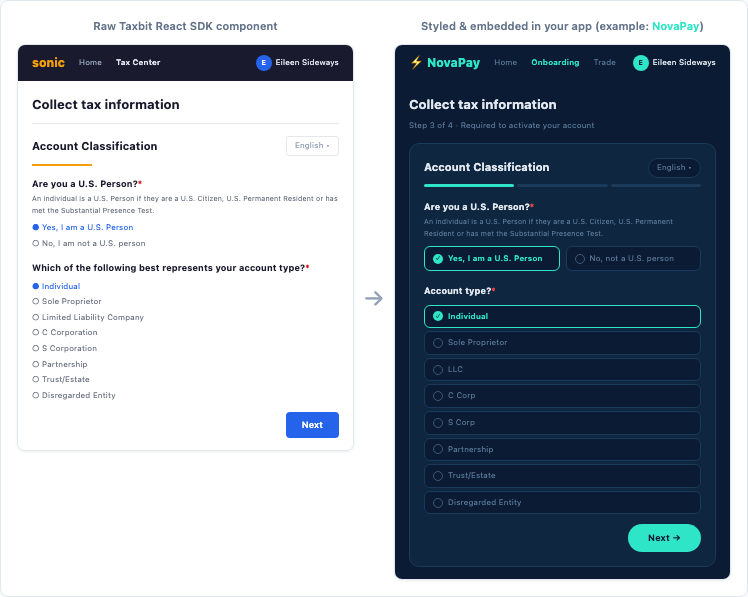
For local development, demoMode={true} runs the component with no token and no API calls — everything else in this doc applies once you switch to a real token.
The end-to-end lifecycle
A submission moves through eight stages:
- Provision — your server creates an Account Owner for the user.
- Authorize — your server mints an Account Owner-scoped token and passes it to the browser.
- Render —
TaxbitQuestionnairemounts with that token and any pre-fill data. - Collect — the user answers only the questions Adaptive can't already satisfy. The questionnaire sends usage telemetry as the user moves through it (see Usage telemetry).
- Submit — once the form passes client-side validation,
onSubmitfires, thenonSuccesson Taxbit's confirmation (oronErroron failure), andonSettledafter either. - Validate — TIN (W-9) and VAT (DPS) checks run asynchronously, resolving in minutes to hours.
- Report — final status arrives through
useTaxbitand webhook events. - Re-collect — if circumstances change,
needsResubmissionsends the user back through the questionnaire. For specific, curable W-8 issues,needsCuringDocumentationroutes the user toTaxbitCuringDocumentationto clear just the open issue.
A VAT number that fails its VIES check doesn't stop stage 5. Since 6.2.0 the summary shows an "Invalid" badge beside the VAT number, and the user can still submit.
The sections below explain the model behind these stages; the Questionnaire integration guide implements them.
The security and token model
The SDK is split across a trust boundary. Your server holds the client_secret and obtains a tenant-scoped token, then exchanges it for an Account Owner-scoped token — narrow authority for one person. Only the narrow account owner token should be exposed to the users session in the browser.
sequenceDiagram
    participant Server as Your Server
    participant Taxbit as Taxbit API
    participant Client as Your React App

    Server->>Taxbit: POST /v1/oauth/token
    Taxbit-->>Server: tenant-scoped bearer token

    Server->>Taxbit: POST /v1/account-owners
    Taxbit-->>Server: 201 Created

    Server->>Taxbit: POST /v1/oauth/account-owner-token
    Taxbit-->>Server: Account Owner-scoped bearer token

    Server->>Client: Pass Account Owner-scoped token

    Client->>Taxbit: <TaxbitQuestionnaire /> submits form
    Taxbit-->>Client: Success
Usage telemetry
From 6.2.0, TaxbitQuestionnaire reports usage events to Taxbit. These cover the questionnaire loading, each step shown, Next / Back / Edit / Submit presses, validation errors shown, real-time TIN and GIIN check outcomes, and submission. Events carry step ids, field keys and coded validation keys such as required. They never carry what the user typed.
Events use the same bearer token and the same environment, region or proxyDomain as the rest of the SDK's requests. No new host or credential is involved. If an event fails to send, the questionnaire carries on as normal. Telemetry is on by default. Pass telemetry={false} to turn it off, and the SDK then makes no telemetry requests. Demo mode sends nothing. TaxbitCuringDocumentation doesn't send usage events. See Usage telemetry in the integration guide for proxy and CSP details.
Account Owners and Accounts
The SDK operates on an Account Owner — the person whose documentation you collect. An Account is separate: it represents a transactional relationship, not a person, and is used for transaction reporting. The SDK doesn't require one.
The questionnaires
Three questionnaire types, by reporting regime:
W-FORM— U.S. forms (W-9, W-8BEN, W-8BEN-E, W-8IMY)DPS— digital-platform-seller reporting (DAC7 and equivalents)SELF-CERT— self-certification of tax residency for CRS, CARF, and DAC8 reporting
The choice is driven by your reporting obligations and the user's status. To map a situation to a type, see Pick your questionnaire.
Adaptive collection
The SDK can shorten the flow by skipping questions you already have valid answers for, so returning users move faster. A few fields — signatures, controlling-person data on entity Self-Cert — are always re-collected regardless of pre-fill.
See Adaptive mode for the modes (full, skipLock, skipEdit), skip rules, and per-form data shapes.
Where to embed
Two primary patterns:
Onboarding flow. Embed the SDK at the end of signup so a W-form is on file before the account is funded or any reportable events occur. This is the most common pattern for platforms with regulatory collection requirements at onboarding.
Account Profile / Settings. Embed the SDK in the account settings area for on-demand collection. This works well when tax documentation is not required at signup but may be needed later (for example, when a reporting threshold is crossed).
What's supported
Platforms
React 16-19 and TypeScript 5, in modern browsers. The component calls the Taxbit API from the browser, so your Content Security Policy must allow it — see Connect your backend for the directive.
The published type declarations resolve under every moduleResolution setting, including node16 / nodenext and CommonJS require, and type-check with skipLibCheck: false.
Server rendering
The SDK works with server-rendered frameworks like Next.js. On the server, the questionnaire renders its loadingComponent (or nothing), so the page hydrates without a mismatch. To skip the server render entirely, load the component client-side only. See Server rendering.
Accessibility
The questionnaire targets WCAG 2.1 AA (6.0.0 and later). The SDK handles labels, group semantics, live-region announcements for errors and status, focus management between steps, autofill hints, and AA contrast in the bundled stylesheets. Some criteria can only be met by the page around the SDK, so you provide:
- a
<title>that changes with each step, <html lang>, and- a place in your heading outline where the SDK's
<h4>section titles fit.
The package ships ACCESSIBILITY.md with the full split. See Meet accessibility requirements.
Mobile
On mobile you render the component in a webview and bridge its callbacks to native code, passing the Account Owner token to the webview page. See mobile webview embedding for platform-specific components and UX guidance. For a fully native experience, see Native Mobile Tax Documentation Collection (Beta), which is in development.
Post-submission remediation
W-8 submissions can come back with specific, curable issues — a US address indicator, a treaty-country mismatch, an unsupported PO Box. TaxbitCuringDocumentation resolves these in place by collecting targeted evidence and a reasonable explanation, rather than re-running the questionnaire. Curing is W-8 only; W-9 issues route back through TaxbitQuestionnaire. See the Curing integration guide.
Languages
The questionnaires localize automatically. From 6.0.0, the SDK downloads only the language it is showing, and fetches another one the first time the user switches to it. Every locale carries every string, so no copy falls back to English. See the supported-language matrices for the full lists, per-form coverage, and the language prop.
Updated 4 days ago